
Plotters: Difference between revisions
New page |
piss |
||
| (14 intermediate revisions by the same user not shown) | |||
| Line 1: | Line 1: | ||
Base currently owns two HP T520 plotters: Richard, a 36" printer, and Isaac, a 24" printer. | {{Project|name=Richard|homepage=Ethernet: https://10.48.1.84/ | ||
WiFi: https://10.48.0.226/|status=Working|os=VxWorks?|image=Protter-richard.jpg|founder=just showed up?}} | |||
{{Project|name=Isaac|founder=Filip|status=Kept for parts|image=Plotter-isaac.jpg}} | |||
Base currently owns two HP T520 plotters: Richard, a 36" printer, and Isaac, a 24" printer. They can do prints slightly larger than A0 at a resolution of 1200 DPI. Both are owned and managed by Filip. | |||
== Printing == | == Printing == | ||
Richard should show up automatically when trying to print (if using Windows or Linux with CUPS and Avahi). | Richard can print from a 914mm paper roll (slightly larger than A0), or individual A3 paper sheets. Follow the instruction on the screen to load/unload paper. | ||
<!-- TODO: Try mining a PPD file for it --> | |||
If not, try manually adding IP | Richard should show up automatically when trying to print (if using Windows or Linux with CUPS and Avahi).<!-- TODO: Try mining a PPD file for it --> If not, try manually adding the IP (see ''Homepage'' on the right). | ||
There may be a problem that the plotter doesn't receive the correct dimensions of the image, and defaults to printing only the bottom right A4 area. if this happens, make sure that you are sending the print job with the correct paper size. | |||
[[File:PrintingLargeScale.png|none|thumb|How to fix problems with larger prints.]] | |||
For larger print jobs on Linux, using Scribus is recommended. Simply create a new project with the desired paper size, drag in the image tool, in the Image Properties tab on the right select your wanted DPI, double click it to set the file, right click Image > Adjust frame to image to scale up the image. To print, export it to PDF, open it in your operating system's print menu, set the correct paper size, and print (printing from Scribus seems to be broken). | |||
[[File:Scribus-screenshot.png|none|thumb|How to use Scribus for large prints.]] | |||
== Details == | == Details == | ||
=== Richard === | === Richard === | ||
<!-- TODO Write about Richard --> | |||
Richard used to belong to Base, but after a deal with Thebys and fixing it, it now belongs to Filip. | |||
Richard has a management webpage, where you can see much more information. See ''Homepage'' above. | |||
=== Issac === | === Issac === | ||
Isaac has been purchased by Filip for spare parts, he did not have a motherboard (previous owner sent it to HP and never got it back), and was used for repair or Richard. | Isaac has been purchased by Filip for spare parts, he did not have a motherboard (previous owner sent it to HP and never got it back), and was used for repair or Richard. Richard also came with official HP ink (HP01-HP04) and the paper tray, that is now installed in Richard. | ||
F to pay respects. | F to pay respects. | ||
=== Repair === | |||
Before trying any repair on your own, contact Filip for guidance. It's HP. | |||
After being crowned Certified HP-authorized personnel, Filip managed to obtain a service manual<ref>https://nextcloud.at.base48.cz/s/LGsrZbKb3JcGNYH</ref>. If it wants some code for resetting, it's there. | |||
=== Provenance === | === Provenance === | ||
| Line 21: | Line 42: | ||
==== Cartridges ==== | ==== Cartridges ==== | ||
< | There seem to be two price tiers of alternative cartridges - ones that work, and ones that leak and destroy the printhead. Because of the latter, we had to purchase Isaac and repair Richard. Before buying a new cartridge, make sure it will not leak! Because of that, I've opted to number and track all cartridges. '''Due to this fact, please do not throw away cartridges! They might be important for researching proper alternatives!''' It may be possible to transfer ink from unofficial cartridges to official ones - however, this has not been tested, the plotter may complain. | ||
From their reviews, it seems Alza's toner leaks. | |||
===== Unofficial ===== | |||
{| class="wikitable" | |||
|+ | |||
!Cartridge | |||
!State | |||
!Notes | |||
|- | |||
|CHINA0001-0004 | |||
|In use. | |||
|0004 is from Gigaprint.cz, sometimes skips on odd rows. Rest unknown origin. Seem to work fine, caution advised. | |||
|- | |||
|CHINA0005 | |||
|Destroyed | |||
|Unknown origin. Leaks. Destroyed Head 1. | |||
|- | |||
|CHINA0006-0007 | |||
|? - won't test | |||
|Unknown origin. Same set as 0005 and 0008. | |||
|- | |||
|CHINA0008 | |||
|Destroyed | |||
|Unknown origin. Leaks. Destroyed Head 1. | |||
|} | |||
<gallery mode="nolines" widths="240"> | |||
File:Dcc4ae6f-d429-42a7-81a8-e476db0dd883a.jpg|CHINA0001-0004 | |||
File:9c0f2fca-9240-4e55-8c62-32dd982c8f66.jpg|CHINA0005-0008 Note the D for Destroyed. | |||
</gallery> | |||
===== Official ===== | |||
{| class="wikitable" | |||
|+ | |||
!Cartridge | |||
!State | |||
!Notes | |||
|- | |||
|HP01-04 | |||
|Malfunctioning. | |||
|Came with Isaac. The printer does not recognize any if them. | |||
|} | |||
==== Print heads ==== | ==== Print heads ==== | ||
Head 1 comes from Richard, and was destroyed after using a bad cartridge. It is now installed in Isaac. | |||
Head 2 (serial number 2394302729115889, etched on side) comes from Isaac, and seems to work, as such it is installed in Richard. | |||
< | ==== Paper ==== | ||
The maximum width of roll paper is 914mm. We have had success with this paper from Alza<ref>https://www.alza.cz/smartline-ploa090-914-50-d4076653.htm</ref>, however it is quite thin and not suited for quality posters. There are also some misprints you can print on from the opposite side, however we have not yet found a permanent location for them.<references /> | |||
[[Category:Equipment]] | |||
Latest revision as of 20:03, 8 August 2026

System(s):

Base currently owns two HP T520 plotters: Richard, a 36" printer, and Isaac, a 24" printer. They can do prints slightly larger than A0 at a resolution of 1200 DPI. Both are owned and managed by Filip.
Printing
Richard can print from a 914mm paper roll (slightly larger than A0), or individual A3 paper sheets. Follow the instruction on the screen to load/unload paper.
Richard should show up automatically when trying to print (if using Windows or Linux with CUPS and Avahi). If not, try manually adding the IP (see Homepage on the right).
There may be a problem that the plotter doesn't receive the correct dimensions of the image, and defaults to printing only the bottom right A4 area. if this happens, make sure that you are sending the print job with the correct paper size.

For larger print jobs on Linux, using Scribus is recommended. Simply create a new project with the desired paper size, drag in the image tool, in the Image Properties tab on the right select your wanted DPI, double click it to set the file, right click Image > Adjust frame to image to scale up the image. To print, export it to PDF, open it in your operating system's print menu, set the correct paper size, and print (printing from Scribus seems to be broken).

Details
Richard
Richard used to belong to Base, but after a deal with Thebys and fixing it, it now belongs to Filip.
Richard has a management webpage, where you can see much more information. See Homepage above.
Issac
Isaac has been purchased by Filip for spare parts, he did not have a motherboard (previous owner sent it to HP and never got it back), and was used for repair or Richard. Richard also came with official HP ink (HP01-HP04) and the paper tray, that is now installed in Richard.
F to pay respects.
Repair
Before trying any repair on your own, contact Filip for guidance. It's HP.
After being crowned Certified HP-authorized personnel, Filip managed to obtain a service manual[1]. If it wants some code for resetting, it's there.
Provenance
Cartridges
There seem to be two price tiers of alternative cartridges - ones that work, and ones that leak and destroy the printhead. Because of the latter, we had to purchase Isaac and repair Richard. Before buying a new cartridge, make sure it will not leak! Because of that, I've opted to number and track all cartridges. Due to this fact, please do not throw away cartridges! They might be important for researching proper alternatives! It may be possible to transfer ink from unofficial cartridges to official ones - however, this has not been tested, the plotter may complain.
From their reviews, it seems Alza's toner leaks.
Unofficial
| Cartridge | State | Notes |
|---|---|---|
| CHINA0001-0004 | In use. | 0004 is from Gigaprint.cz, sometimes skips on odd rows. Rest unknown origin. Seem to work fine, caution advised. |
| CHINA0005 | Destroyed | Unknown origin. Leaks. Destroyed Head 1. |
| CHINA0006-0007 | ? - won't test | Unknown origin. Same set as 0005 and 0008. |
| CHINA0008 | Destroyed | Unknown origin. Leaks. Destroyed Head 1. |
-
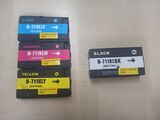 CHINA0001-0004
 -
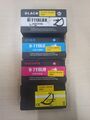 CHINA0005-0008 Note the D for Destroyed.


Official
| Cartridge | State | Notes |
|---|---|---|
| HP01-04 | Malfunctioning. | Came with Isaac. The printer does not recognize any if them. |
Print heads
Head 1 comes from Richard, and was destroyed after using a bad cartridge. It is now installed in Isaac.
Head 2 (serial number 2394302729115889, etched on side) comes from Isaac, and seems to work, as such it is installed in Richard.
Paper
The maximum width of roll paper is 914mm. We have had success with this paper from Alza[2], however it is quite thin and not suited for quality posters. There are also some misprints you can print on from the opposite side, however we have not yet found a permanent location for them.